In the world of visual content creation, Canva has become a household name. It has democratized design, allowing anyone—from students to professional marketers—to create stunning visuals without needing a degree in complex graphic software.
But if you’ve been using the complimentary version, you’ve likely run into those tempting little crown icons. The big question is: should you pull out your wallet for the premium tier? In this comprehensive review and comparison, we break down exactly what you get, who it’s for, and whether it’s worth your hard-earned money.
Canva Free vs Canva Pro
To truly understand the value of the premium version, we need to look at how it stacks up against the standard version across the core pillars of the platform.
1. Key Differences in Features
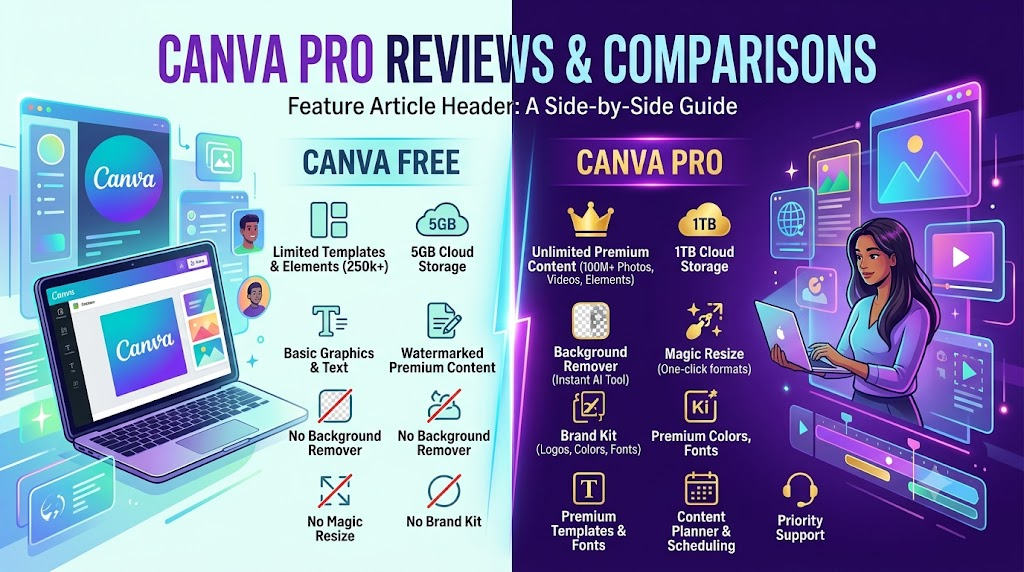
While the standard experience lets you create beautiful designs using a standard drag-and-drop editor, it comes with strict limitations. The premium tier unlocks game-changing editing tools. The most notable is the Magic Resizer, which allows you to turn a single design into an Instagram post, a Facebook banner, and a YouTube thumbnail simultaneously with a single click.
2. Storage Capacity
- Free: Gives you 5 GB of cloud storage, which can fill up surprisingly fast if you upload a lot of high-resolution images or videos.
- Pro: Bumps your storage up to a massive 1 TB (1,000 GB). You practically never have to worry about running out of space or deleting old drafts to make room for new projects.
3. Brand Tools (The Brand Kit)
If you manage a website, business, or specific online presence, consistency is everything.
- Free: You have to manually enter your hex color codes every single time you start a new design.
- Pro: Unlocks the Brand Kit. You can upload your custom logos, save your specific brand fonts, and set up multiple color palettes. When designing, your brand assets are always just one click away, ensuring your content remains perfectly aligned with your visual identity.
4. Premium Assets
The content library difference is night and day:
- Free: Access to roughly 4 million photos, graphics, and templates.
- Pro: Grants unlimited access to a staggering 100+ million premium photos, videos, audio tracks, and graphics, along with over 610,000 premium templates. No more paying $1 per image or hunting for third-party copyright-free stock photos.
5. AI Features (Magic Studio)
The premium tier is packed with advanced, time-saving AI tools:
- Magic Eraser & Background Remover: Isolate products or people from an image flawlessly in one click.
- Magic Write: An AI-driven text generator to help brainstorm copy, headlines, or content outlines directly in your design workflow.
- Magic Edit & Morph: Swap out elements in a photo using simple text prompts or apply complex textures to shapes effortlessly.
6. Team Collaboration
While the standard tier allows you to share links to view or edit, the premium tier transforms the platform into a collaborative workspace. You can set up workflows, leave real-time comments, tag team members, and set specific brand controls so nobody accidentally changes your official brand fonts or colors.
7. Export Options
The premium version grants absolute control over your final files. You can export images with transparent backgrounds (essential for web logos and transparent graphics), compress files for faster web loading speeds, and export designs directly as editable PowerPoint presentations or high-quality SVGs.
Who Is Canva Pro Best For?
The premium tier isn’t a one-size-fits-all solution, but it provides specialized value to several distinct groups:
- Bloggers: Perfect for those who need to crank out high volumes of Pinterest pins, featured images, and blog banners quickly. The ability to batch-create and instantly resize graphics saves hours of manual work every week.
- Affiliate Marketers: When promoting digital products, software, or courses, eye-catching banners, review graphics, and social media carousels are vital. The massive library of premium stock assets ensures your promotional content looks premium, trustworthy, and optimized for conversions.
- Small Businesses: Ideal for brick-and-mortar or digital businesses that want to maintain a professional, cohesive brand identity without hiring an expensive, full-time graphic designer.
- Educators: Teachers and online instructors can build engaging presentation decks, worksheets, and interactive lesson plans using specialized educational templates and illustrations.
- Content Creators: Essential for YouTubers, TikTokers, and Instagram influencers. Access to premium video editing tools, audio tracks, and quick background removal makes formatting vertical or horizontal video content incredibly smooth.
- Teams: For collaborative environments, marketing agencies, or remote working groups that need to share assets, assign tasks, and maintain strict brand compliance across multiple projects.
Our Verdict
If you only need to make a quick flyer once a year or design a casual greeting card, the free version of Canva is more than capable and remains one of the best free design tools on the web.
However, if you are building an online presence, running a business, or consistently producing content, Canva Pro is an absolute must-have investment.
The time saved by using the background remover, the Magic Resizer, and having an entire multi-million asset library built directly into your dashboard easily justifies the monthly subscription fee. It removes the friction from content creation, allowing you to focus entirely on strategy and growth. If you want your platform or brand to look professional and cohesive, upgrading to the premium tier is a balanced, highly cost-effective decision that will pay dividends in your workflow efficiency.